-1.png?width=150&height=36&name=crystal-quest-logo-400px%20(1)-1.png)
Locate Compatibility Information
Crystal Quest provides multiple built-in resources to help you quickly identify the correct replacement cartridge for your system.
Use the options below to confirm the exact part number and size before ordering.
Filter Housing Labels (Fastest Method)
Many Crystal Quest systems include a specification label directly on the filter housing that lists:
-
Compatible cartridge part numbers
-
Cartridge size (2.5" or 4.5" diameter)
-
Cartridge type or model
Check:
-
The housing sump (white or blue bottom section)
-
The side of the housing
-
The mounting bracket or head
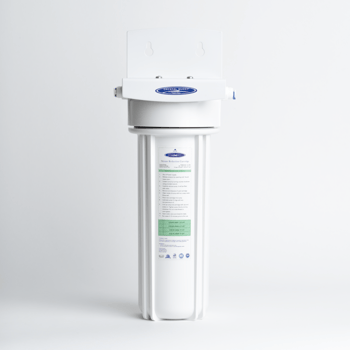
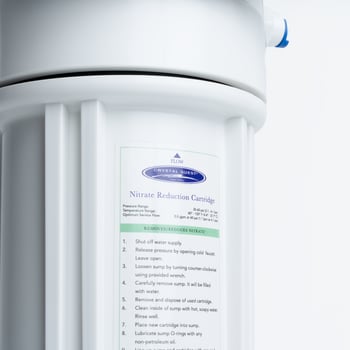
This is often the quickest way to verify compatibility without paperwork.
The Crystal Quest Website
Visit your system’s product page at crystalquest.com. Each listing includes:
-
Parts & Components tab
-
Direct links and SKU numbers for the correct replacement cartridges
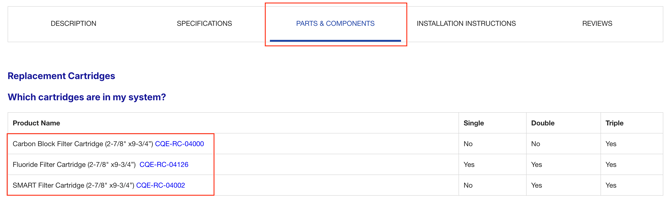
Simply search your system model number or name to locate the correct replacements.
Account History
If you’ve ordered from Crystal Quest before, you can also use your order history to identify the exact system or cartridge you purchased:
Check Your Previous Order History (Most Accurate for Repeat Customers)
Log into your Crystal Quest account at account.crystalquest.com
Go to Account → Order History
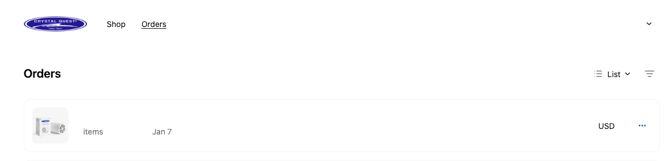
Open the relevant order
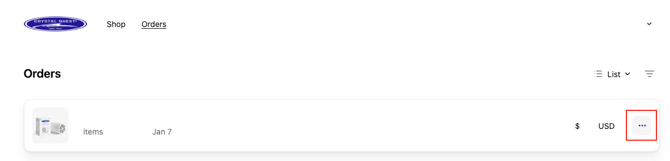
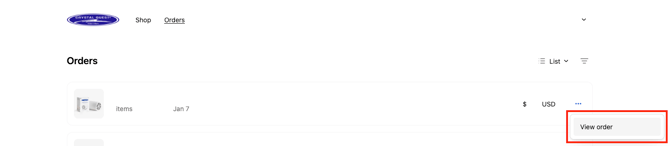
Click the product name (or copy the product name/SKU)
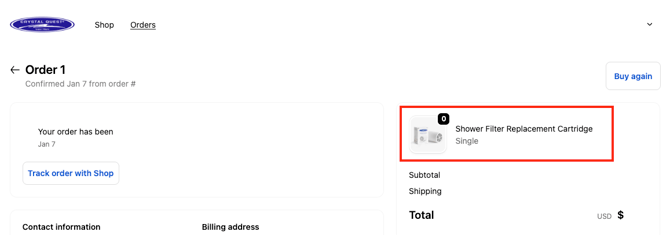
Navigate to that product page and open the Parts & Components tab to view the correct replacement cartridges.
Tip: If you purchased multiple systems, match the item name in your order to the model name printed on your system housing label to confirm compatibility.
Product Packaging
Original packaging frequently lists:
-
Replacement cartridge part/SKU numbers
-
System specifications and dimensions
-
Included components
If you still have your box or inserts, check the specifications panel or documentation for reference.
System Owner’s Manual
Your owner’s manual contains a list of:
-
Compatible replacement cartridges
-
Part numbers
-
Recommended replacement intervals
-
Maintenance instructions
If you’ve misplaced your printed copy, digital manuals are available on our website.
Pro Tip
If you can confirm either the cartridge part number or system name/model number, you can confidently order the correct replacement.
If you’re unsure, contact Crystal Quest support with a photo of your system and we’ll help you identify the right cartridge.
Contact Crystal Quest Support
If you’re unsure or unable to confirm the correct replacement, our team is happy to help.
Simply contact Crystal Quest support and provide:
-
Your system model number (if available)
-
A photo of your system or filter housing
-
Your previous order number (if applicable)
Our team will quickly identify the exact replacement cartridge for you.
You can reach us by phone, email, or live chat at crystalquest.com.